

 Install Now
chrome.google.com
5,000+ users
Install Now
chrome.google.com
5,000+ users
Works as an extension for Chrome, Yandex.Browser, and latest versions of Opera.
Start tracking reads in under a minute.
How It Works
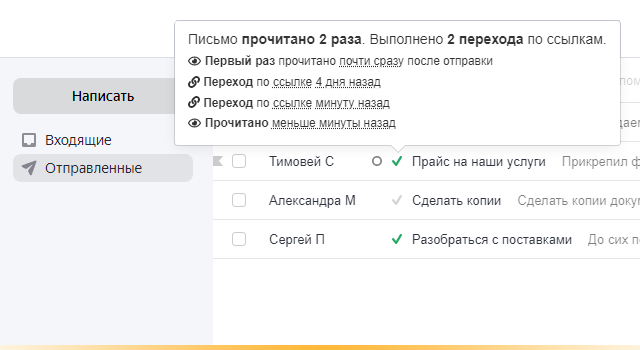
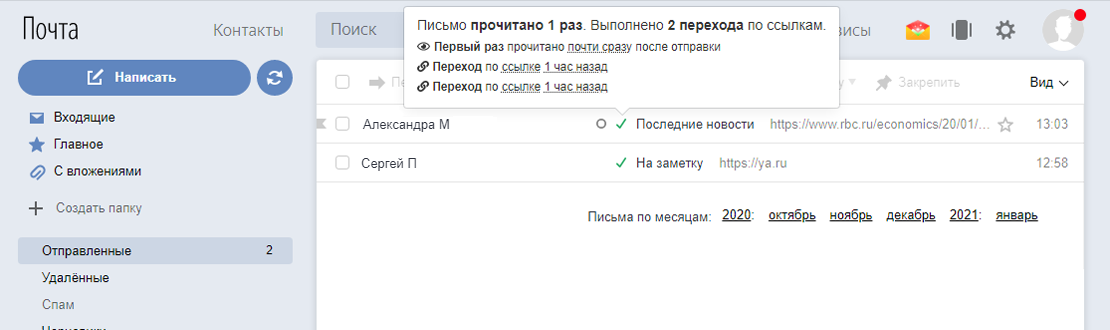
After sending an email, a gray check mark appears next to it in the "Sent" folder. When the recipient opens the email, the check mark turns green. This way, the sender (you) can know when the email has been read.
TraksPaks Features for Yandex.Mail
- Read Tracking Check marks in the "Sent" folder show the read status of your emails
- Link Click Tracking
- Instant (push) notifications about email reads: Email Read and Link Click Notifications - TraksPaks
- About reads, link clicks, and still-unread emails
- Link Click Tracking
- About reads, link clicks, and still-unread emails
- Viewing Reports - TraksPaks
- Segmenting Tracked Email Statistics with Categories - TraksPaks
- Statistics Export

In January 2021, our project team discovered TraksPaks for working with emails.
Before this, we tried working with other trackers, but they didn't work for us for various reasons.
What we like about TraksPaks: first, ease of use - install the extension and refresh your browser page, and you can start using the service immediately. You don't need to press any buttons each time. You just send an email, and when the other party opens it, you get a notification.
Second, quick communication with developers - when we had a tracking issue, they quickly explained what happened and just as quickly resolved it.
Third, and most importantly, the extension really works well, and you know that your email has been delivered and opened. And if it hasn't been opened, the service will send you a reminder so you can follow up.
In January 2021, our project team discovered TraksPaks for working with emails. Before this, we tried working with other trackers, but they didn't work for us for various reasons. What we like about TraksPaks: first, ease of use - install the extension and refresh your browser page, and you can start using the service immediately. You don't need to press any buttons each time. You just send an email, and when the other party opens it, you get a notification.
In January 2021, our project team discovered TraksPaks for working with emails.
Before this, we tried working with other trackers, but they didn't work for us for various reasons.
What we like about TraksPaks: first, ease of use - install the extension and refresh your browser page, and you can start using the service immediately. You don't need to press any buttons each time. You just send an email, and when the other party opens it, you get a notification.
Second, quick communication with developers - when we had a tracking issue, they quickly explained what happened and just as quickly resolved it.
Third, and most importantly, the extension really works well, and you know that your email has been delivered and opened. And if it hasn't been opened, the service will send you a reminder so you can follow up.
vopros@trekspeks.ru